
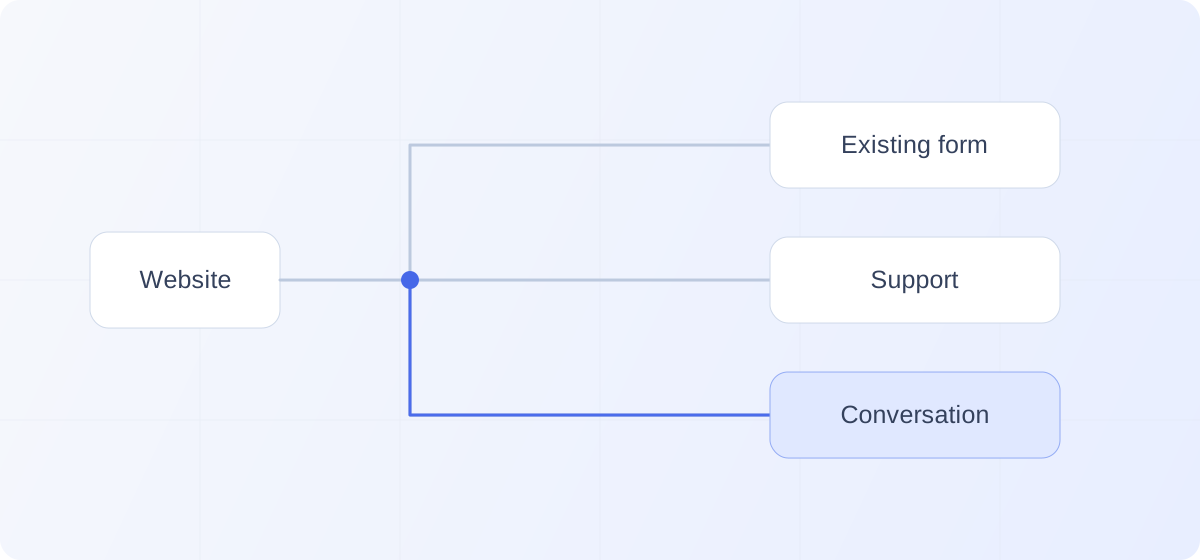
TL;DR: Start an inbound AI SDR on one defined prospect journey, keeping demo, signup, and support paths usable even when the conversation cannot load. Approve knowledge sources, define required CRM and scheduling actions, and keep the previous setup restorable. Expand once the deployment is reliable and useful within that scope, judging commercial impact separately from launch readiness.
“What happens to the experience we already have?”
It is a reasonable question when considering an inbound AI SDR.
Your demo form may generate useful meetings. Customers may depend on the existing support messenger. A self-serve signup flow may produce revenue without a conversation.
You want to improve website conversion without asking those people to navigate a new obstacle.
To deploy an AI SDR responsibly, choose the prospect journey she will serve, establish the information and actions she needs, preserve the paths that already work, and verify the complete experience before expanding access.
The first deployment does not need to become a website transformation project.
It needs to give a defined group of prospects better help.
Choose the first journey deliberately
Start with a situation where a conversation has a clear purpose.
Perhaps prospects evaluating one product repeatedly ask questions about implementation. Perhaps a pricing page leaves suitable companies unsure which plan fits. Perhaps a campaign introduces a complex use case that requires explanation.
Choose a journey your team can describe and monitor.
The homepage is not automatically the best starting point. It may serve prospects, customers, job applicants, partners, and people arriving for unrelated reasons.
A narrower set of commercial pages can make the first deployment easier to understand.
Some messaging platforms support this kind of targeting. Intercom, for example, documents launcher visibility based on page URLs, visitor attributes, and campaign conditions. Confirm the controls available in the product you are evaluating rather than assuming every system supports the same configuration.
The scope should be narrow enough to manage and substantial enough to reach relevant prospects.
A page with almost no commercial activity may feel safe, but it can leave you with little evidence about whether the experience helps.
Preserve the next step for every visitor
Before changing the website, map the paths people already use.
Someone ready to book should retain a clear way to schedule. Someone ready to start a trial should be able to start. An existing customer should still be able to reach support.
Then decide where the AI SDR fits.
For a fictional B2B platform, the arrangement might look like this:
| Visitor situation | Intended path |
|---|---|
| Prospect needs help evaluating a product | Conversation with the AI SDR |
| Prospect is already ready to request a demo | Existing booking path remains available |
| Customer needs account-specific support | Established support channel |
| Visitor wants to start the self-serve product | Existing signup flow |
| Prospect has a requirement needing specialist review | Clear handoff with an identified owner |
These destinations do not all need equal prominence on every page. They do need to remain understandable and usable.
Avoid putting two competing launchers on top of each other and expecting visitors to know which department owns which.
The operating arrangement belongs behind the experience. A prospect should not have to understand your software stack to ask a question.
Treat support access as a requirement
An existing chatbot may produce very few sales meetings and still perform valuable work.
If customers rely on it for support, removing it without a replacement creates a service problem.
A sales-focused AI SDR does not automatically need to become a support product. She does need an appropriate response when a customer arrives with a service request.
That might be a direct link into the established support experience. It might be a configured transfer where the systems support one.
Be precise about the difference.
Providing a link helps the customer reach another destination. An integrated handoff may also carry identity and conversation context. Do not promise continuity the connection does not provide.
Test the path as a customer.
Can they reach help? Do they have to repeat information? Does authentication work? Is the destination staffed or otherwise able to respond?
There is a technical distinction here, too: hiding a launcher is not necessarily the same as disabling the behavior behind it. Intercom’s documentation notes that automatic messages can still be delivered when the standard launcher is hidden.
Review targeting, triggers, and integrations together. Removing an icon alone may not prevent competing experiences.
Prepare approved knowledge, not an indiscriminate content dump
Your public website is a useful starting source.
It should not automatically become the final authority for every answer.
An older page might describe a retired plan. A recent product release may not yet be documented. An internal note might contain information that helps employees but should never be repeated to prospects.
Give the deployment a clear information boundary.
Identify the current sources for product capabilities, pricing, qualification, implementation, and important limitations. Decide which material can inform public responses and which must remain restricted.
When sources conflict, resolve the conflict before asking the AI SDR to choose between them.
This is not simply about collecting more documents. It is about making the right information usable.
Assign someone to own updates as the business changes. A launch should not depend on one person remembering, months later, that the pricing explanation needs to be revised.
The useful standard is:
Every material claim should have a current source and a person responsible for keeping it current.
Specify what each integration must accomplish
“Connected to the CRM” leaves too much unexplained.
Write down what the connection is expected to do.
Should it create a new contact, update an existing one, attach a summary, preserve account ownership, or initiate a follow-up task? Which fields are required? What happens when information is missing?
Test those decisions with realistic records.
A new prospect and an existing contact should not necessarily follow the same path. Nor should a returning prospect automatically create another copy of an opportunity already being worked.
CRM behavior varies by entry method. HubSpot, for example, documents different deduplication rules for contact and company records and notes that companies created through APIs are not automatically deduplicated by domain.
A familiar integration logo does not settle those details.
Apply the same discipline to scheduling.
Confirm the eligible representatives, meeting types, time zones, availability, and fallback when no suitable time exists.
Then inspect the result in the connected systems.
The integration is working when the agreed action completes correctly, not merely when an authorization screen says “connected.”
Test the page around the conversation
The website still has to work when the AI SDR is present.
Open the experience on a phone, a tablet, and a desktop. Check whether the input remains visible when the mobile keyboard appears. Navigate with a keyboard. Open and close the conversation. Scroll to the footer.
Can someone still use the form? Are support links accessible? Does the launcher obscure an important control? Does audio require an intentional action?
Test with slower connections and with the external service unavailable.
Google’s web performance guidance explains that third-party scripts can affect loading, responsiveness, and reliability. It also describes comparing the page with a script enabled and blocked to understand its impact.
That is a useful deployment check.
Your website should have a deliberate fallback when the conversational service cannot load. A failed dependency should not trap page scrolling or make every commercial next step inaccessible.
Use the vendor’s supported installation and visibility controls. Avoid private interface manipulations that may break after an update.
Roll out with a way back
Before going live, identify who can pause the experience and what pausing it actually does.
Can new conversations be stopped while current ones finish? Does the previous launcher return? Are forms and scheduling still available? Who reviews any interrupted handoffs?
Record the known-good configuration and the steps required to restore it.
Begin with internal testing, then expose the approved experience to the chosen live scope. Mark test records so they do not appear as customer results.
During the initial period, review conversations frequently enough to catch material errors before they repeat across many prospects.
The exact cadence should match the volume and risk of the deployment. A quiet page and a high-traffic product launch do not create the same monitoring workload.
Expand once the experience is reliable and useful within its current scope.
Do not add five new audiences simply because installation on the first page was technically easy.
Separate launch readiness from commercial results
Some problems can be identified immediately.
A missing input field, incorrect product claim, broken calendar, or failed handoff needs correction as soon as it appears.
Commercial results take longer to interpret.
You need relevant prospects to encounter the experience, engage when it helps them, and progress far enough for the team to assess the outcome.
That creates two different reviews.
The operational review asks whether the experience works correctly.
The commercial review asks whether it improves the website’s contribution to qualified pipeline.
Do not force the second conclusion because the first review passed.
Also avoid changing the entire website, traffic strategy, pricing, and qualification rules at once and then attributing the result to the AI SDR.
Keep a record of meaningful changes. Preserve a comparable baseline where possible. For a controlled experiment, choose a consistent assignment method so the same prospect does not repeatedly switch experiences during one evaluation.
A focused rollout gives you a clearer explanation of what changed and why.
Make ownership visible
Someone needs to own the deployment after the launch meeting ends.
That person should know where unanswered questions appear, who approves knowledge changes, how failed actions are handled, and when an issue requires technical support.
Marketing, sales, customer support, and security may each own part of the process. In a small company, one person may wear several of those hats.
The number of people matters less than whether the responsibilities are explicit.
A recurring question can become clearer website copy. A repeated qualification mistake can lead to a better rule. A failed handoff can reveal an operational gap that existed before the AI SDR arrived.
Treat those findings as product and process work.
The deployment should become easier to operate as you learn.
Frequently asked questions
Do we need to replace our demo form?
No. Preserve a working path for prospects already ready to meet. An AI SDR can help people who need answers before taking that step. Whether to change the form later should depend on evidence, not a desire to make every interaction conversational.
Can an AI SDR coexist with our support platform?
Potentially, with clear targeting and a verified support path. Confirm which visitors see each experience and whether handoffs transfer context or simply provide a destination. Test the customer journey rather than assuming the systems coordinate automatically.
How quickly should we expand beyond the initial pages?
Expand when the current deployment is reliable, the team can operate it, and there is evidence that additional pages serve a relevant need. Installation speed alone does not establish readiness for a wider rollout.
Give the conversation a clear place to succeed
Kassie’s setup includes business knowledge, qualification criteria, routing configuration, calendar testing, and deployment on selected website pages.
The purpose is to make a useful conversation available where prospects need it.
You do not need to dismantle a working inbound motion to find out whether that helps.
Choose the journey. Preserve the other paths. Verify the complete experience. Then expand from what you learn.
A good deployment adds capability without making your prospects or customers absorb the complexity.