
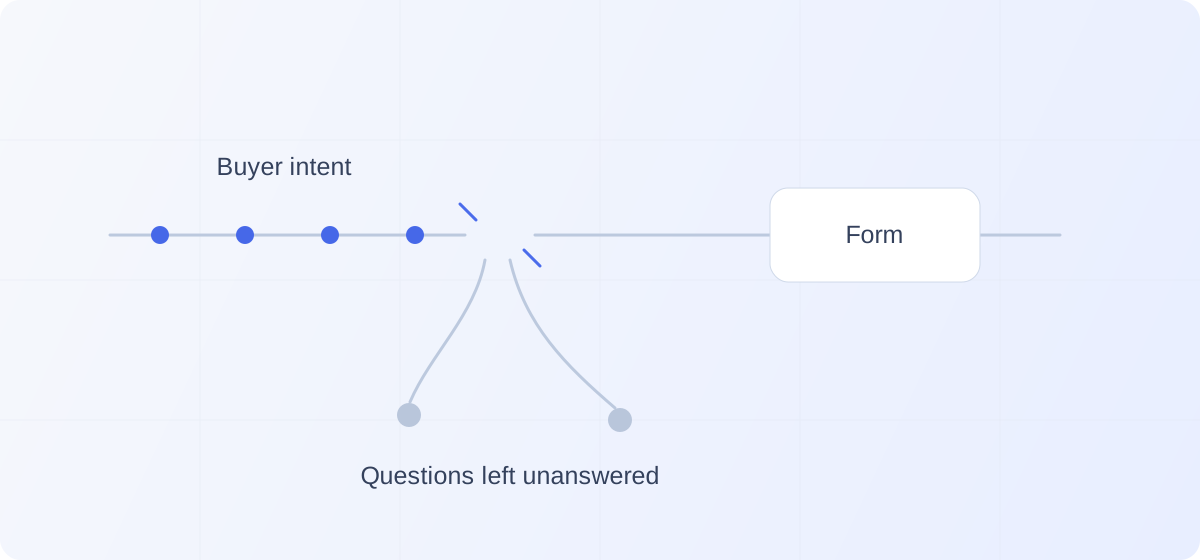
TL;DR: B2B websites can leak potential pipeline when relevant prospects leave because a question about integrations, pricing, or fit goes unanswered and only a demo request is offered. Form-abandonment and lost-opportunity reports miss them, while exit counts overstate the loss. Keep the working form, address specific gaps, and check whether suitable prospects become accepted opportunities.
A prospect can rule your business out without ever becoming a lead.
Consider a familiar scenario. An operations leader is comparing platforms. A colleague recommended yours. They visit your website, recognize the problem you solve, and open the integrations page.
Their CRM is listed. Good.
But they need to know whether the integration supports a particular workflow. The page does not explain it. They check the product page, find a broad promise about connected systems, and end up at a demo form.
They have one question. Your website is asking them to start a sales process.
They leave to investigate another option.
Nothing appears in your lost-opportunity report. There was no opportunity to close. The commercial conversation never began.
Pre-form website pipeline leakage is the missed chance to create pipeline when a relevant prospect leaves because they cannot get the clarity or help they need to continue.
That is potential pipeline, not a qualified opportunity you can already count. The distinction matters because the opportunity to improve conversion is real, while its size still needs to be established.
The challenge is finding the prospects your current process never gets far enough to understand.
Your demo form shows you who made it through
A completed form is useful evidence.
Someone understood enough about your business, found a reason to continue, and accepted the next step you offered.
But a process can work for the people who complete it while leaving another group underserved.
Suppose your demo requests produce good meetings. That tells you the form is useful for prospects ready to request a demo. It does not tell you whether other relevant visitors needed an answer before they could reach that point.
Those visitors are easy to overlook because they never enter the workflow your team manages.
There is no lead to assign. No follow-up to miss. No qualification decision to review.
Even form-abandonment reporting starts partway through the story. Google Analytics distinguishes between form_start, the first interaction with a form in a session, and form_submit. Comparing them helps identify people who began a form but did not submit it. It does not explain the decisions of visitors who never started the form at all.
Shortening a form might help someone who found it too demanding.
It will do little for someone who never reached it because they could not work out whether your product met an essential requirement.
There is friction inside the form, and there is uncertainty before the form. They need different solutions.
The evaluation begins before the introduction
A prospect does not start evaluating your business when they introduce themselves.
By that point, they may already have compared alternatives, discussed requirements internally, and developed a preference.
In its 2025 study of nearly 4,000 B2B buyers, 6sense reported that 94% had ranked their vendor shortlist before engaging with sellers. That research concerns the broader purchasing journey, not website abandonment specifically, but it establishes something important: meaningful decisions happen before the first vendor conversation.
Your website participates in those decisions.
It can help someone understand why your product belongs on their shortlist. It can also leave an important question unresolved at the moment they are deciding whether to keep investigating.
The prospect does not owe you an explanation when they move on.
That is why reviewing only submitted leads gives you an incomplete view of the experience. It shows what happened after some prospects decided to engage. It tells you much less about what prevented others from doing so.
The question worth asking is:
What would a suitable prospect need to understand before requesting a meeting, and how easily can they find it?
Where a promising website visit stalls
The gap is often between a general claim and the specific decision a prospect needs to make.
An integration logo says a connection exists. It may not explain what information moves, in which direction, or under what conditions.
A pricing page names the plans. It may leave the prospect unable to estimate which one their team needs.
A security page promises strong controls. It may not address the requirement that determines whether the prospect can consider the product.
These are opportunities to inspect, not proof that every website has the same problem.
The feature is explained, but its relevance is not
Imagine a product page that describes configurable approval workflows.
A prospect understands the capability. Their question is whether regional teams can manage their own approvals while headquarters keeps visibility across the business.
Repeating “flexible approval workflows” does not resolve that question.
Neither does sending the prospect back to the page they just read.
They need enough context to connect the capability to their situation. That might come from a clear example, product documentation, a relevant customer story, or a conversation.
Before adding another feature description, ask whether the existing explanation helps a prospect make a decision.
The prospect cannot establish commercial fit
A company does not need to publish a final quote for every possible configuration.
But consider what a prospect can realistically determine before contacting you.
Can they understand what drives the price? Which capabilities belong in which plan? Whether implementation is included? Whether there is a minimum commitment?
A vague pricing page can leave a suitable prospect unsure whether a conversation is worth pursuing. An apparently low price can create a different problem if the capabilities they need require a substantially different package.
Give them a reasonable basis for evaluating the purchase.
Some will discover that the product is outside their budget. That is useful clarity. Others will have enough information to continue with a more serious conversation.
The website asks for commitment before providing confidence
A demo request is a reasonable next step for someone who wants a demo.
It is a larger ask for someone trying to answer one question.
They may be preparing an internal recommendation. They may need to confirm a requirement before involving colleagues. They may simply want to avoid booking a meeting that turns out to be irrelevant.
“Interested enough to investigate” and “ready to schedule” are different states.
A website that offers only the second step leaves the prospect to bridge the gap alone.
The opportunity is to provide useful help without making that help conditional on a meeting.
The next step is unclear
Even someone willing to submit a form may have unanswered questions about what follows.
Will they choose a time immediately? Will someone contact them later? Is the meeting a product demonstration, a qualification call, or a discussion about their requirements?
Make the process explicit.
If the next step is a call, explain its purpose. If the prospect can schedule immediately, show that. If a response will come later, set an expectation your team can reliably meet.
The same principle applies to a conversational interface. An invitation to ask a question should lead to useful help, rather than an unexpected demand for contact information.
Keep the path that already works
A working demo form is an asset.
So is a self-serve purchase flow. So is a support channel customers depend on.
You do not need to remove them to help prospects who need something different.
Someone arriving ready to book should be able to book. Someone ready to start using the product should be able to start. Someone with a question should have a way to ask it.
Research also argues against treating every prospect as if they want the same experience. In findings published in May 2026, Gartner reported that 70% of surveyed B2B buyers preferred a fully digital, self-service purchasing experience, while 69% preferred to validate AI-generated information with sales representatives. Independent exploration and access to human judgment can both matter within the same buying journey.
That is not evidence that everyone wants an AI conversation. It is a reason to make different forms of help available without forcing prospects through the wrong one.
The role of a website conversation is to help someone continue when the existing pages have not resolved what matters to them.
It should earn engagement by being useful.
An exit is not proof of lost pipeline
Be careful with the arithmetic.
If 5,000 people visit your website and 50 request a demo, the other 4,950 are not automatically lost prospects.
Some may be existing customers. Others may be job applicants, researchers, or people whose requirements you cannot serve. A relevant prospect might leave because they found the answer they needed and intend to return.
Nor does a long visit prove commercial interest.
Google Analytics defines engagement using behaviors such as session duration, key events, and page views. Those measures describe activity. They do not establish whether someone fits your ideal customer profile or why they left.
Treat website behavior as a clue to investigate.
Repeated visits to an integrations page might suggest unresolved questions. They might also reflect careful research by someone who is progressing normally.
A high exit rate on pricing might indicate confusion. It might mean the page is successfully helping poor-fit prospects disqualify themselves.
The loss worth addressing is a suitable prospect leaving because of avoidable friction or uncertainty.
That is a narrower and more useful target than trying to make every visitor convert.
Find the unanswered question
The most useful investigation starts with what prospects are trying to decide.
You do not need to begin with a complete website rebuild.
Listen to questions that arrive after someone books
Review the opening questions in real discovery calls.
What did prospects still need to understand? What did they misinterpret? What nearly stopped them from reaching out?
If the same question repeatedly appears before a useful commercial conversation can begin, check whether the website answers it clearly.
The prospects who booked are not representative of everyone who left. But they can reveal uncertainties worth investigating.
Test a realistic decision on the website
Ask someone who resembles your ideal customer to investigate a specific situation.
For example:
“You need to replace your current platform, keep an existing integration, and begin with one department. Use the website to decide whether this product is worth evaluating.”
Watch where they hesitate. Ask what they expected to find. Notice whether the next action helps them resolve the uncertainty or merely asks them to make contact.
The useful result is a specific gap you can address.
“People seem confused” is difficult to act on.
“Prospects cannot tell whether the integration supports updating existing records” gives you a concrete improvement to make.
Use questions to improve the page itself
If a question applies to many prospects, answer it where it belongs.
Clarify the pricing page. Add the missing deployment detail. Show the relevant workflow. Link to the evidence.
A conversational experience should complement clear information, not compensate for information deliberately withheld.
Reserve the conversation for situations where context changes the answer, the prospect needs guidance, or the website cannot reasonably anticipate every variation of the question.
Test whether resolving the gap changes anything
An observation becomes valuable when it leads to a better outcome.
Start with a specific hypothesis:
“Prospects evaluating our enterprise plan cannot tell whether their required workflow is supported. Making that answer easier to obtain should help suitable prospects continue.”
Then make a focused change.
That might be clearer copy, a product example, better documentation, or an invitation to ask about the workflow.
Where traffic allows, compare similar groups of visitors through a controlled test. With lower volume, combine behavioral evidence with direct prospect feedback and be cautious about attributing every change in results to the website.
Look beyond the new interaction itself.
More questions asked can be useful, but they do not necessarily mean more opportunities. More meetings through a conversation can also reflect prospects moving away from the demo form rather than an increase in total demand.
The business question is whether more suitable prospects progress and eventually become accepted opportunities.
Keep that distinction intact. Otherwise, you can improve a dashboard while leaving the commercial outcome unchanged.
Where an inbound AI SDR can help
Some questions need a short answer. Others need a conversation.
A prospect may ask about an integration, then reveal that the real concern is migrating without interrupting an existing process. Someone asking about pricing may need help understanding which configuration fits their team.
An AI SDR can make that conversation available while the prospect is still on the website.
Kassie is built to answer prospect questions from approved business knowledge, apply qualification criteria, and help qualified prospects book with the sales team inside the conversation.
The sequence matters. Help the prospect understand what they came to find out. Use the conversation to establish fit. Offer a useful next step when it makes sense.
There are limits.
If the required capability does not exist, the answer should be clear. If the information is unavailable, the system should acknowledge the gap. If the website attracts people the business cannot serve, a more fluent conversation will not create product-market fit.
The opportunity is to help relevant prospects whose interest could otherwise end at an unanswered question.
Frequently asked questions
Can a website lose potential pipeline even if its demo form performs well?
Yes. The form may work well for prospects who are ready to request a meeting while providing little help to relevant visitors who still need clarification. Strong form performance is a reason to preserve that path and investigate what happens before it.
Is website pipeline leakage the same as form abandonment?
No. Form abandonment concerns people who begin a form and do not complete it. Pre-form pipeline leakage concerns potential commercial conversations that never reach that stage. The prospect may leave a product, pricing, or integration page without opening the form.
How can you tell whether unanswered questions are costing opportunities?
Look for repeated uncertainties in prospect conversations, test realistic evaluation tasks on the website, and examine relevant behavioral data. Then address a specific gap and assess whether suitable prospects progress more often. An exit rate alone cannot establish the cause or the value of the potential loss.
Help the prospect who is still deciding
There is a prospect your demo form serves well: the person who already wants to meet.
There may be another who needs help getting there.
They have recognized something relevant in your business. They are investigating whether it will work for them. One unresolved question stands between their current interest and a reason to continue.
Give that prospect a clear answer, a useful example, or a conversation.
They may discover the product is not a fit. They may need more time. Or they may have enough confidence to take the next step.
Your website should give them the chance to find out.